
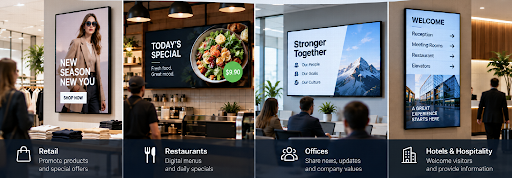
Walk into a modern restaurant, retail store, office, hotel, clinic, gym, showroom, or reception area and there is a good chance you will see digital signage at work.
The screen might be promoting today’s special. It might show directions, company announcements, opening hours, a new product, a QR code, a menu, or an upcoming event.
To the customer, it is simply a screen.
For the business, however, digital signage is something much more useful: a communication channel that can be updated whenever the message changes.
Instead of printing another poster, replacing a menu board, emailing instructions to every branch, or manually loading files onto individual televisions, businesses can manage content centrally and publish it to connected screens.
That is the real value of modern digital signage.
Here’s how businesses use it—and why it can make sense even for companies with only a few screens.
What Is Digital Signage in Business?
Digital signage is the use of TVs, commercial displays, monitors, tablets, video walls, or other digital screens to communicate information to customers, visitors, or employees.
What separates digital signage from an ordinary television is the way the content is managed.
With cloud-based digital signage software for restaurants, a business can upload content through an online dashboard, decide which screens should show it, schedule when it should appear, and update those screens remotely.
BuzzBlender, for example, follows a straightforward process:
Connect a device → Upload media → Publish to screens.
From there, businesses can manage playlists, schedules, screen status, QR codes, and content remotely from a centralized dashboard.
The screen is only the visible part of the system. The real value comes from being able to control what appears on it.
Why Do Businesses Use Digital Signage?
Businesses use digital signage because information changes.
Prices change.
Promotions change.
Menus change.
Events change.
Employees need new information.
Products come and go.
Opening hours change.
A printed sign starts becoming outdated from the moment it is printed.
A digital screen can be updated when the business needs it.
That makes digital signage particularly useful for organizations that communicate frequently or operate across several locations.
1. Businesses Use Digital Signage to Promote Products
Retail is one of the clearest examples.
A customer walking into a store may see a screen promoting a new product, seasonal campaign, loyalty program, limited-time discount, or product category.
Unlike a printed poster, that screen can show several campaigns in rotation.
For example, a retailer could display:
09:00–12:00: New arrivals
12:00–16:00: Current promotion
16:00–20:00: Loyalty-program campaign
The following day, the entire schedule could change.
That flexibility allows marketing teams to treat screens more like digital media channels than static signs.
2. Restaurants Use Digital Signage for Menus and Promotions
Restaurants, cafés, bakeries, food courts, and quick-service businesses can use screens as digital menu boards.
The obvious advantage is that menu content can change without reprinting physical boards.
But scheduling makes the idea much more useful.
A café could display breakfast menus in the morning, automatically switch to lunch content at midday, and promote afternoon specials later in the day.
Additional screens can promote high-margin items, new products, loyalty programs, takeaway options, or seasonal offers.
If something changes, the business can update the content remotely rather than printing and installing a replacement.
3. Offices Use Screens for Internal Communication
Not all digital signage is advertising.
Companies can use office screens to communicate with employees.
That might include company news, upcoming events, safety information, targets, dashboards, employee recognition, onboarding information, meeting reminders, or internal campaigns.
The advantage is visibility.
An email competes with dozens of other emails. A message on a strategically positioned office screen can become part of the physical workplace.
Businesses can also rotate different types of content on the same display.
A screen might show a performance dashboard for several minutes, followed by an event announcement, employee recognition, and a safety reminder.
4. Businesses Use Digital Signage to Welcome Visitors
Reception areas are another natural location for digital signage.
Instead of leaving a television playing generic content, businesses can use it intentionally.
A reception screen might display:
Welcome to Our Office
followed by information about the company, directions, meeting instructions, current projects, visitor information, or branded content.
Hotels can welcome guests.
Clinics can provide visitor information.
Corporate offices can display company messaging.
Showrooms can introduce products before a salesperson even approaches the visitor.
The screen becomes part of the customer or visitor experience.
5. Digital Signage Can Help Customers Find Their Way
Large buildings often need directional information.
Hospitals, universities, shopping centres, offices, hotels, conference venues, airports, and large retail locations can use screens to help people understand where they need to go.
Unlike permanent directional signage, digital wayfinding information can be changed.
If a meeting moves from Room A to Room B, for example, the screen can be updated.
For temporary events, changing layouts, or buildings where information frequently changes, this flexibility is particularly valuable.
6. Businesses Use QR Codes to Connect Screens With Phones
A screen is excellent for attracting attention, but customers usually cannot interact with a traditional display directly.
QR codes provide a simple bridge.
A business could display:
Scan to View the Menu
Scan to Book
Scan to Claim the Offer
Scan to Learn More
Scan to Register
Scan to Shop
The customer sees the message on the larger screen and continues the interaction on their phone.
BuzzBlender supports dynamic QR-code overlays, allowing businesses to add QR codes to screen content without necessarily redesigning the underlying creative each time. (buzzblender.com)
This turns a passive screen into a potential traffic and engagement channel.
7. Multi-Location Businesses Use Digital Signage for Central Control
This is where digital signage becomes particularly valuable.
Imagine operating 30 stores.
Marketing launches a promotion tomorrow.
Without centralized screen management, somebody may need to send files and instructions to every store. Employees then have to download the correct creative and update their local screens.
Some stores might update immediately.
Others might forget.
One might display the wrong version.
With cloud-managed digital signage, the campaign can instead be controlled centrally.
Head office uploads the approved content, assigns it to the appropriate screens, sets the schedule, and publishes it.
This gives businesses something extremely valuable: central control without requiring every screen to show exactly the same thing.
A national campaign could appear everywhere while individual stores still display location-specific content.
8. Businesses Schedule Content Instead of Changing It Manually
Scheduling is one of the most practical digital signage features.
If you already know when content should appear, there is little reason to rely on an employee remembering to change it manually.
A gym could advertise morning classes before work and evening classes later in the day.
A restaurant could automatically switch menus.
A retailer could schedule a weekend campaign to begin Friday afternoon and disappear Sunday evening.
An office could show a visitor welcome message only during a particular event.
BuzzBlender supports scheduling content by time and day, allowing businesses to prepare campaigns in advance and manage them through a cloud dashboard. (buzzblender.com)
Automation reduces routine administration and lowers the risk of outdated promotions remaining visible.
9. Businesses Can Manage Screens They Already Own
One misconception about digital signage is that adopting it always requires buying an entirely new hardware system.
That is not necessarily the case.
Depending on compatibility, businesses may be able to use TVs, commercial signage displays, computers, Android devices, or other existing hardware.
BuzzBlender currently supports remote content management across several environments, including Samsung, LG, Android, Philips, Windows, and Linux. (buzzblender.com)
This is important because the cost of digital signage is not only software.
Replacing 30 functioning screens simply because a CMS requires different hardware can dramatically change the economics of a project.
Our advice for businesses is simple:
Check what hardware you already own before buying anything new.
Already Have Samsung Commercial Displays?
If your business already uses Samsung Smart Signage displays, you may be able to turn those screens into centrally managed digital signage without adding a separate external player.
BuzzBlender supports Samsung Signage Displays running the SSSP platform. Its official installation guide covers both USB and URL-based installation methods, including device preparation, installation, activation, and troubleshooting. (buzzblender.com)
Follow the complete guide here:
How to Install BuzzBlender on Samsung Signage Display (SSSP)
Once BuzzBlender is installed, the display can be connected to the cloud dashboard using its access code. From there, businesses can upload content, create playlists, schedule campaigns, and publish to the screen remotely. (buzzblender.com)
For companies that have already invested in Samsung commercial signage, using the display’s integrated smart-signage capabilities can help simplify the deployment.
How Does a Business Actually Start Using Digital Signage?
The process does not need to be complicated.
Step 1: Decide What the Screen Is Supposed to Achieve
Don’t begin by buying technology.
Begin with the business objective.
Do you want to increase awareness of promotions?
Replace printed menus?
Improve internal communication?
Welcome visitors?
Display company dashboards?
Promote events?
Provide directions?
A screen without a clear purpose can quickly become an expensive television showing content nobody pays attention to.
Define the objective first.
Step 2: Use an Existing Screen Where Practical
Check whether the TVs or commercial displays your business already owns can be used.
This can significantly reduce the initial cost of experimenting with digital signage.
If you’re buying new displays, consider how long they will operate each day, their brightness, orientation, location, warranty, and whether commercial signage hardware would be more appropriate than consumer televisions.
Step 3: Connect the Screen to Your Digital Signage CMS
The exact method depends on your display.
Some smart TVs and commercial displays can run signage software directly, while other screens may require an external media player or connected computer.
BuzzBlender supports several platforms so businesses can manage different screen technologies without necessarily standardizing the entire organization around one hardware vendor. (buzzblender.com)
Step 4: Upload Your Content
Next, upload the media you want to display.
BuzzBlender’s current Basic plan supports images, videos, web pages, and HTML content. (buzzblender.com)
For most business signage, the content itself should remain simple.
Use large text.
Use clear imagery.
Keep the primary message easy to understand.
Avoid turning a television into a webpage filled with tiny text.
People may only look at your screen for a few seconds.
Step 5: Create Playlists
A playlist lets several pieces of content rotate on the same screen.
A retailer could combine:
New products → Promotion → Brand message → QR campaign → Loyalty program.
An office could use:
Company announcement → KPI dashboard → Upcoming event → Employee recognition.
The playlist becomes the programming for the screen.
Step 6: Schedule the Content
Determine when the playlist or individual campaign should run.
Think about your audience rather than simply filling a calendar.
What information matters at 08:00?
What matters at lunchtime?
What should customers see at the weekend?
What should disappear when a promotion ends?
Scheduling makes digital signage responsive to the context in which people actually see it.
Step 7: Publish and Monitor
Once everything is ready, publish the content to the selected displays.
Then make sure those displays stay online.
BuzzBlender provides active and inactive screen monitoring, allowing administrators to check screen status remotely. (buzzblender.com)
This becomes increasingly important when screens are located in different buildings, cities, or countries.
What Does Business Digital Signage Cost?
Cost varies considerably depending on screens, hardware, software, installation, and the complexity of the deployment.
For the CMS itself, BuzzBlender’s Basic plan currently starts at $5 per screen per month. (buzzblender.com)
At that rate, the simple software calculation is:
| Screens | Monthly Software Cost | Annual Software Cost |
| 1 | $5 | $60 |
| 5 | $25 | $300 |
| 10 | $50 | $600 |
| 25 | $125 | $1,500 |
| 50 | $250 | $3,000 |
| 100 | $500 | $6,000 |
These figures simply multiply the currently published $5 Basic monthly rate and do not include taxes, hardware, installation, connectivity, or other deployment expenses.
The key lesson for businesses is to calculate costs at the future size of the network, not just today’s screen count.
A platform that looks inexpensive for three screens may tell a different story at 100.
Is Digital Signage Worth It for a Small Business?
It can be, but not every business needs it.
If you own one shop, have one television, and change the message twice per year, displaying a static file may be perfectly adequate.
Don’t introduce software simply because digital signage sounds modern.
But consider a café where the menu changes throughout the day.
Or a store running new promotions every week.
Or a clinic regularly updating visitor information.
Or a small chain with five locations.
Once content changes frequently, remote publishing and scheduling can start saving meaningful administrative time.
The question is not how big the business is.
The question is how often the message changes and how difficult those changes are to manage manually.
Digital Signage vs. Printed Signs
Digital signage does not need to replace every printed sign.
Permanent information such as safety markings, legally required notices, room numbers, and basic wayfinding may still be better suited to physical signage.
Digital displays are strongest when information changes.
| Printed Signage | Digital Signage |
| Excellent for permanent information | Excellent for changing information |
| Requires replacement when content changes | Content can be updated digitally |
| No software required | Requires a content-management system |
| No power required | Requires powered displays |
| One message per printed surface | Multiple messages can rotate |
| Physical replacement across locations | Remote updates are possible |
| Low complexity | Enables scheduling and automation |
Smart businesses use each format where it makes sense rather than trying to replace every physical sign with a screen.
Common Digital Signage Mistakes Businesses Should Avoid
The first mistake is putting too much information on the screen.
Digital signage should communicate quickly. If viewers need two minutes to read the screen, the creative is probably too complicated.
The second mistake is having no content schedule. Screens displaying expired offers make the business look poorly managed.
Another mistake is giving every location complete control without brand guidelines. Multi-location signage works best when central marketing and local relevance are balanced.
Businesses also sometimes buy hardware before deciding what they actually need the screens to accomplish.
Finally, don’t forget monitoring. A campaign cannot influence anyone if the display has been offline for three days.
Pros and Cons of Digital Signage for Businesses
Advantages
Digital signage makes frequently changing information easier to manage. Businesses can publish remotely, schedule campaigns, rotate several messages on one screen, maintain greater consistency across locations, and potentially reuse compatible hardware.
It also creates opportunities for more contextual communication. Different content can appear at different times, on different screens, for different audiences.
Disadvantages
Digital signage still has costs.
Displays consume electricity, software may have recurring subscription fees, hardware eventually needs maintenance, and somebody still needs to create good content.
It also does not automatically make a message effective.
Putting a bad advertisement on a 65-inch television simply creates a larger bad advertisement.
Technology helps distribute the message. The business still needs to make the message worth seeing.
Our Advice: Start With the Business Problem, Not the Screen
Digital signage projects often become unnecessarily complicated because companies start by discussing hardware and software.
Start somewhere else.
Ask:
What information are we repeatedly trying to communicate?
Then ask:
How often does it change?
And finally:
How much time are we currently spending updating it?
If your employees regularly print new posters, replace menu boards, connect USB drives, send promotional files to branches, or manually update televisions, centralized digital signage may solve a genuine operational problem.
If none of those problems exist, you may not need it yet.
Why BuzzBlender Can Make Sense for Businesses
BuzzBlender is designed around a relatively straightforward model: connect your screens, upload content, and publish.
Businesses can remotely manage content, create and schedule playlists, monitor screen status, add QR-code overlays, and work with multiple supported display platforms through one cloud-based system. (buzzblender.com)
The Basic plan currently starts at $5 per screen per month, which makes the entry cost predictable for organizations that want to start with a few displays and expand later. (buzzblender.com)
For businesses already using compatible Samsung commercial displays, BuzzBlender also provides a dedicated installation path for Samsung’s SSSP platform.
See the step-by-step Samsung SSSP installation guide.
Key Takeaways
Businesses use digital signage because business information changes.
Retailers use it for promotions. Restaurants use it for menus. Offices use it for internal communication. Hotels and clinics use it for visitor information. Multi-location organizations use it to centrally control campaigns across distributed screens.
The real benefit is not the television itself.
It is the ability to manage what appears on that television without repeatedly visiting it.
For most businesses considering digital signage, the best strategy is therefore straightforward: start with a clear communication problem, reuse compatible hardware where practical, choose a manageable CMS, keep content simple, automate predictable changes with scheduling, and expand only when the screens are providing genuine value.
Digital signage works best when the technology disappears into the background and updating a screen becomes just another simple part of running the business.
Frequently Asked Questions
Why do businesses use digital signage?
Businesses use digital signage to communicate promotions, menus, announcements, directions, internal communications, visitor information, dashboards, and other frequently changing information through digital screens.
What businesses benefit most from digital signage?
Retailers, restaurants, offices, hotels, gyms, clinics, schools, hospitality businesses, showrooms, and multi-location organizations are common users. Digital signage is particularly useful when information changes frequently or screens need to be managed across several locations.
Can digital signage be updated remotely?
Yes. Cloud-based digital signage software allows compatible connected screens to be managed remotely through an online dashboard.
Can I use TVs I already own for digital signage?
Potentially. Compatibility depends on the TV, operating system, signage platform, and intended deployment. BuzzBlender currently supports multiple screen and operating-system environments.
Does BuzzBlender work with Samsung commercial signage?
Yes. BuzzBlender supports Samsung Signage Displays using the SSSP platform. Businesses can follow the official Samsung SSSP installation guide for detailed setup instructions.
How much does BuzzBlender cost?
BuzzBlender Basic currently starts at $5 per screen per month. Its published Basic features include content playlists and scheduling, remote content management, screen monitoring, QR-code overlays, media support, and other digital signage capabilities.
Is digital signage only useful for advertising?
No. Businesses also use digital signage for internal communications, dashboards, wayfinding, visitor information, menus, safety messages, company news, events, and employee communications.
Ready to Put Your Business Screens to Work?
If your TVs and commercial displays are already hanging on the wall, they can do more than show static content.
BuzzBlender lets businesses manage compatible screens remotely, schedule content, build playlists, monitor displays, and control multiple locations through one centralized platform—starting at $5 per screen per month.
And if your business already has Samsung commercial signage, start with the BuzzBlender Samsung Signage Display (SSSP) installation guide.